QEMU执行
字数
413 字
阅读时间
2 分钟
以ARM64为例
shell
make qemu_arm64_defconfig
make
执行:
shell
qemu-system-aarch64 -machine virt -nographic -cpu cortex-a57 -bios u-boot.binGDB调试
启动服务端:
shell
# 执行执行
qemu-system-aarch64 -machine virt -nographic -cpu cortex-a57 -bios u-boot.bin -gdb tcp::3333

# 阻塞等待远程GDB链接
qemu-system-aarch64 -machine virt -nographic -cpu cortex-a57 -bios u-boot.bin -gdb tcp::3333 -S
GDB调试连接:
shell
gdb-multiarch u-boot
# 进入gdb
> target extended-remote :3333
GDB调试(重定位)
因为uboot具有重定向原因,所以在重定向之后,我们的gdb表无法正确的识别符号。比如我们想调试board_init_r。

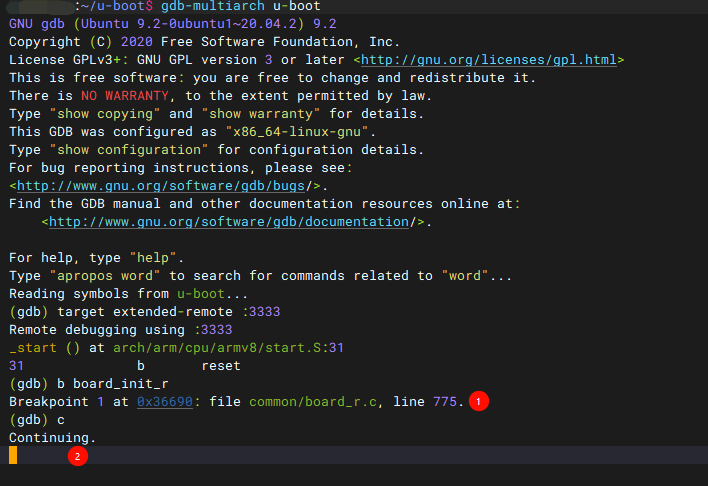
这里可以看到,即便是已经进入命令行了,系统都无法触发board_init_r函数,所以需要通过调整gdb才能进行调试。
我们可以参考u-boot/doc/README.arm-relocation来实现,或者参考以下:
tex
https://wiki.st.com/stm32mpu/wiki/U-Boot_-_How_to_debug
https://spanish-hacker.medium.com/debugging-u-boot-after-relocating-to-ram-65d2e73aeeae
https://m2m-tele.com/blog/2021/10/24/u-boot-debugging-part-2/
我们先正常进行调试:
主机执行:
shellqemu-system-aarch64 -machine virt -nographic -cpu cortex-a57 -bios u-boot.bin -gdb tcp::3333 -S调试端执行:
shellgdb-multiarch u-boot
shell
  (gdb):
  target extended-remote :3333
  symbol-file
  > Discard symbol table from '/home/px/u-boot/u-boot'? (y or n)
  > y

  add-symbol-file u-boot 0x8ff08000
  > add symbol table from file "u-boot" at
          .text_addr = 0x8ff08000
  > (y or n) y

  # 继续执行
  c

  # 进入命令行后中断
  set $s = gd->relocaddr
  symbol-file
  add-symbol-file u-boot $s

  # 设置调试中断
  b board_init_r

  # 继续执行
c我们可以通过在uboot CLI中发现(bdinfo): 
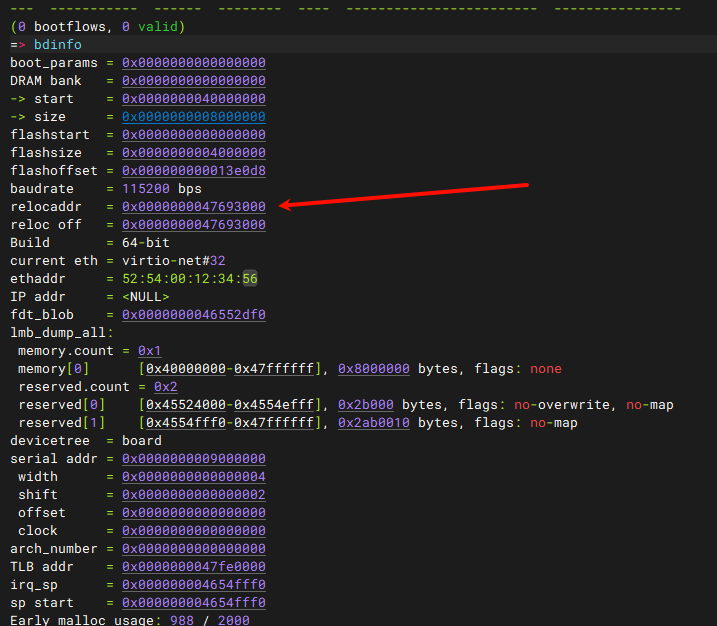
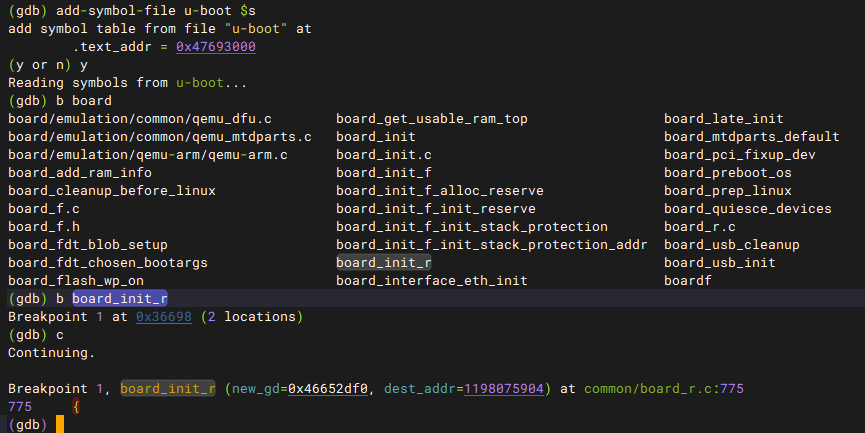
该地址就是gd->relocaddr,之后我们在uboot输入reset,这样gdb会查询到新的(重定位后)符号表位置,正确解析出board_init_r函数。

贡献者
 Px
Px